YOMIORDER / 読み順で表示 · 発売準備中

名前はそのまま。
読みで、探しやすく。

「資料2」「資料10」、地名や人名の入ったファイル。
元の名前と読みを並べて、探したい順に整えます。

いつものフォルダから右クリックで開く、
WindowsとMacのためのファイルビューアです。

使い方を見る ↓
元の名前→読みで並べる
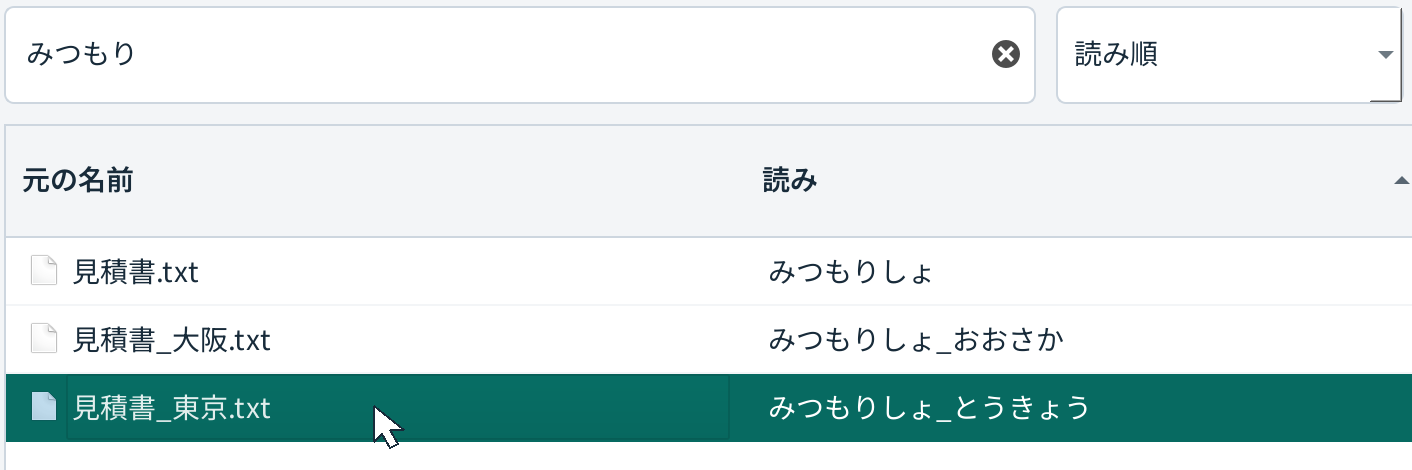
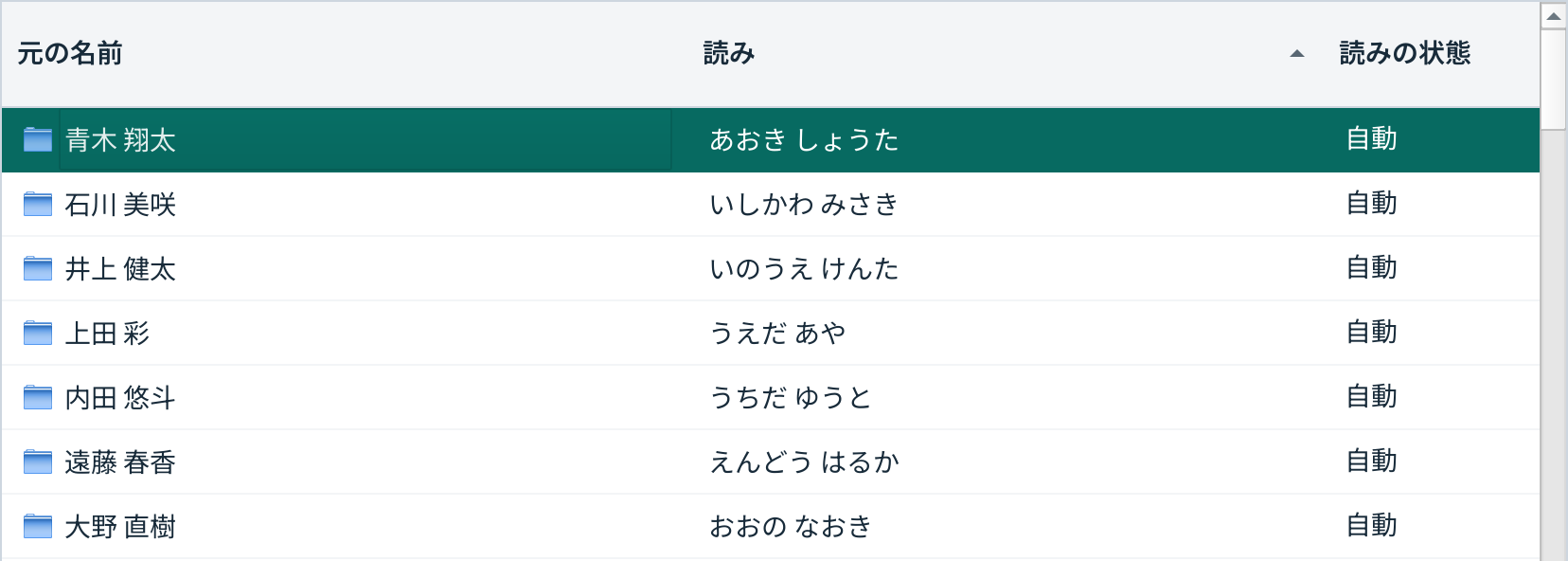
YomiOrderの実画面。元の名前と読みを並べ、日本橋.txtを選択したファイル一覧。
Windows版の実画面 · 架空のデモファイル画面を拡大

右クリックから、
開くまで。

ファイルを改名したり、既存のフォルダを移したりする必要はありません。Finderやエクスプローラーの標準の並び順も変更しません。

  1. フォルダを右クリック

    一覧で見たいフォルダ、またはファイルを選びます。

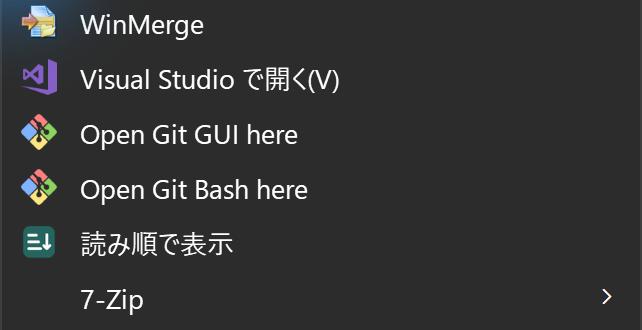
  2. 「読み順で表示」を選ぶ

    元の名前と読みが隣に見える、専用の一覧が開きます。

  3. 探して、開く

    名前・読みで検索し、対象を選んで「開く」。元のファイルをいつものアプリへ渡します。

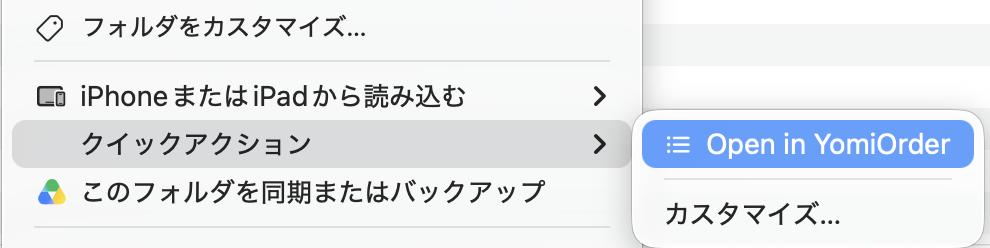
現在のWindows版は「その他のオプションを確認」→「読み順で表示」。Mac版はFinderの「クイックアクション」または「サービス」→「読み順で表示」。メニューの場所はOSや設定で異なります。

名前は変えずに、読みだけ訂正

「日本橋」は、
どちらの読みですか。

地名や人名の読みは、辞書だけでは決めきれません。読み欄のダブルクリックか「読みを直す」で、使いたい読みへ訂正できます。

  • 原本はそのまま。 ファイル名を書き換えません。
  • 訂正は端末内へ。 元のフォルダとは別に保存します。
  • 必要なものへ、すぐ。 名前と読みの両方で検索できます。
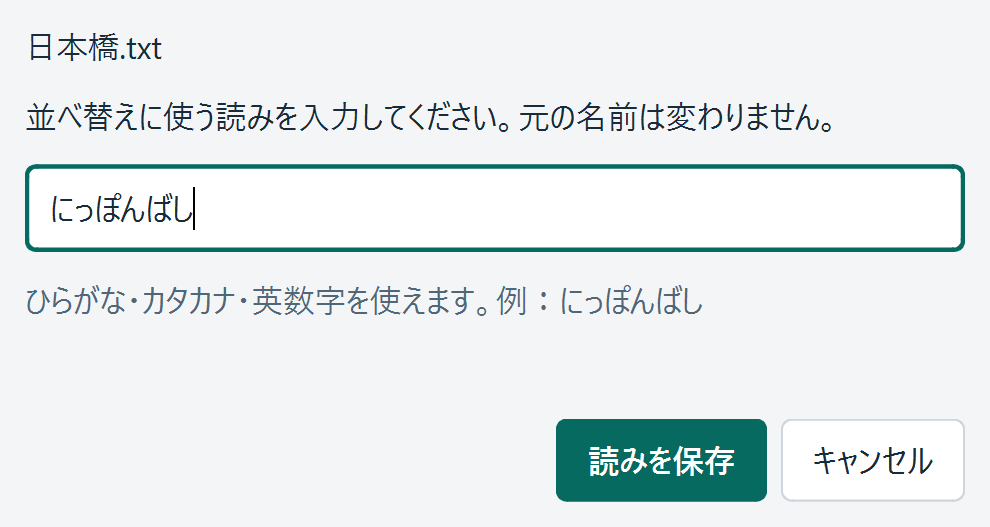
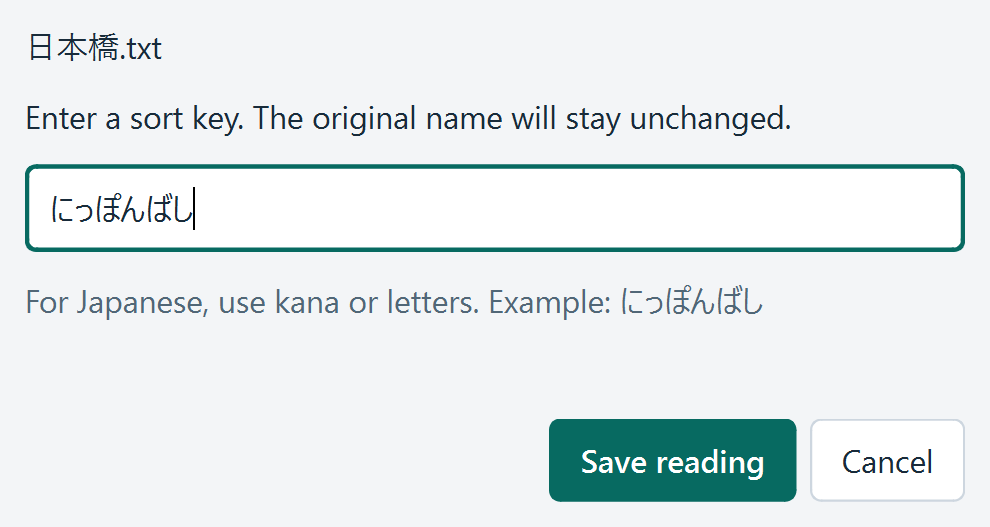
実際の読み訂正画面。日本橋.txtの読みを、にっぽんばしへ入力した例。
架空ファイルを使った実画面。読みは自動推定なので、固有名詞は確認してください。

対応環境

いつものPCで。

対応外の環境で動くことを保証しません。詳細なOS要件と提供方法は、発売前に確定して掲載します。

Windows
x64版を対象。ARM版は未検証。
Mac
Apple silicon版を対象。Intel版は未検証。
画面の表示言語
日本語・英語の2言語。
並べ替えの方式
35の並べ替えプロファイル。35言語の画面翻訳ではありません。
発売準備中 · 価格決定

買い切りの、
小さな道具に。

発売から30日間

¥500税込・買い切り

その後は ¥980 税込・買い切り

発売日は準備完了後にお知らせします。30日間の対象期間はまだ始まっていません。

一度の購入で、ひとりの仕事に。
月額料金・自動更新はありません。

まだ購入・ダウンロードはできません。購入受付が始まるまでは、決済も請求も行いません。

購入・利用条件

  • 1ユーザー、WindowsとMacを合わせて2台まで。Mac+Windows、Windows2台、Mac2台のどれでも使えます。業務利用も対象。
  • ライセンス確認後、最大30日間のオフライン利用を予定。
  • 購入から14日以内の返金申請を個別に審査。すべての申請への返金を保証するものではありません。
  • 消費者の法定の権利は制限しません。

500円で購入した方への、期間終了後の差額請求はありません。海外では決済時に換算後の通貨・総額を表示します。認証・返金・更新などの詳細は最終確認中です。

利用条件の草案を見る →

気になること。

Finderやエクスプローラー自体の並び順は変わりますか?

変わりません。YomiOrderの別ウィンドウで、読みを基準に表示します。元の名前・フォルダ構成は維持します。

自動の読みは必ず正しいですか?

いいえ。人名・地名・略語などは誤読する場合があります。読みを確認し、必要に応じて訂正してください。

35言語に翻訳されていますか?

いいえ。画面は日本語と英語です。35は読み・辞書順などを扱う並べ替えプロファイルの数で、UI翻訳の数ではありません。

ファイル名を外部へ送信しますか?

ファイルの読み・一覧処理は端末内で行います。買い切りライセンス認証には購入・端末の識別情報を使いますが、ファイル名やファイル内容を送る設計ではありません。販売版の詳細は、確定後にプライバシー方針へ反映します。
YOMIORDER / SORT BY READING · PREPARING FOR LAUNCH

Keep the names.
Find them by reading.

Files with Japanese names, place names and numbered documents. See original names beside their readings, in an order that is easier to scan.

A focused file viewer that opens from a folder's right-click menu, on Windows and Mac.

See how it works ↓
Original name→Sort by reading
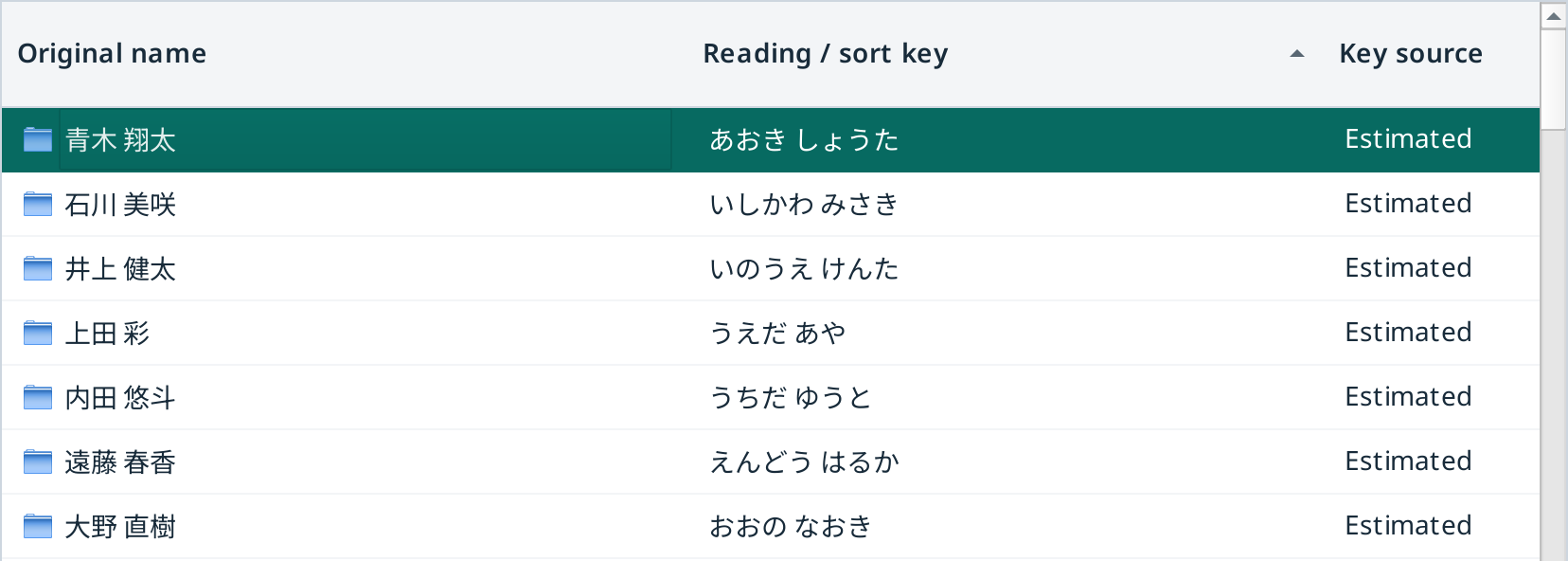
Actual YomiOrder window with original file names alongside Japanese readings and 日本橋.txt selected.
Actual Windows app · Synthetic demonstration filesView full-size image

Right-click.
Read. Open.

No renaming or moving your folders. The default sorting in Finder and File Explorer stays unchanged.

  1. Right-click a folder

    Select the folder or file you want to browse.

  2. Choose “Sort by reading”

    A dedicated list opens with original names beside their readings.

  3. Find it and open it

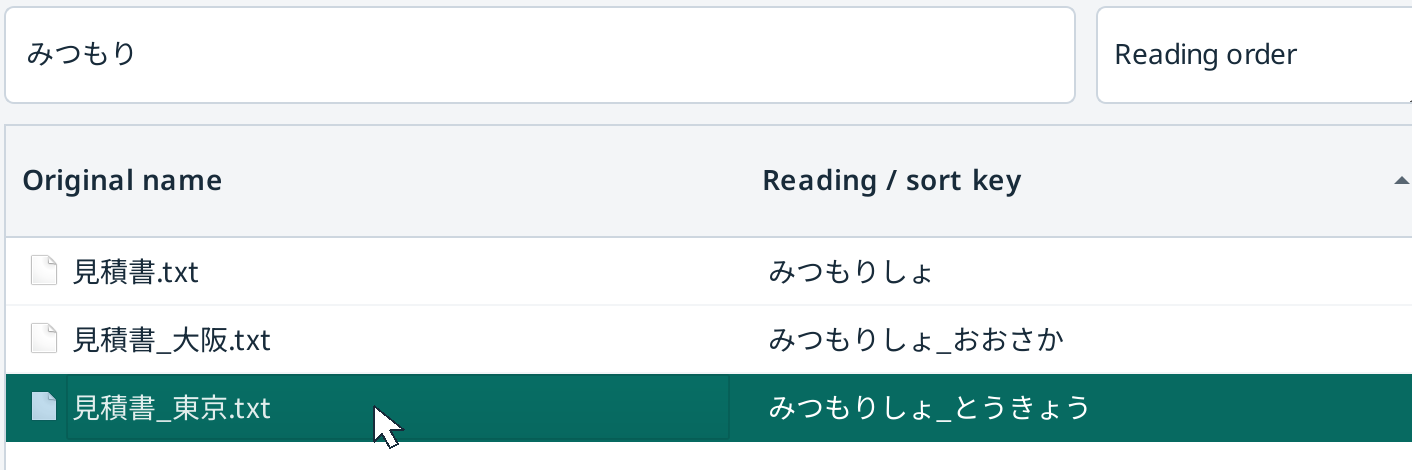
    Search by name or reading, select a file, then choose Open to use its usual application.

The current Windows version uses Show more options → Sort by reading. On Mac, use Finder's Quick Actions or Services → Sort by reading. Menu placement depends on OS and configuration.

CORRECT THE READING, NOT THE FILE NAME

One name.
More than one reading.

“日本橋” can be read differently in different places. When a proper name needs a correction, double-click its reading or choose Edit reading.

  • Keep the original. File names are not rewritten.
  • Save corrections locally. Readings are stored separately from your folder.
  • Search either way. Find files by their name or their reading.
Actual reading editor with にっぽんばし entered for the synthetic file 日本橋.txt.
Actual app with a synthetic file. Readings are estimates; check proper names.

COMPATIBILITY

For your everyday computer.

Other platforms are not verified. Detailed OS requirements and distribution methods will be confirmed before launch.

Windows
x64 is the target. Windows ARM is unverified.
Mac
Apple silicon is the target. Intel Macs are unverified.
Interface languages
Japanese and English.
Sorting methods
35 sorting profiles. This does not mean 35 translated interfaces.
Preparing for launch · Pricing confirmed

A small tool.
A one-time purchase.

FIRST 30 DAYS FROM LAUNCH

¥500One-time, tax included

Then ¥980 one-time, tax included

The launch date will be announced when ready. The 30-day offer has not started.

A one-time purchase for one person's work.
No subscription or automatic renewal.

Purchases and downloads are not yet available. No payment or charge takes place on this page.

Purchase and license terms

  • One user, two computers in total: one Windows and one Mac, two Windows PCs, or two Macs. Business use is included.
  • Up to 30 days of offline use after license verification is planned.
  • Refund requests within 14 days of purchase will be reviewed individually. Approval is not guaranteed for every request.
  • Your statutory consumer rights are not limited.

Launch-price buyers will not be charged the difference later. Outside Japan, checkout displays the converted currency and total. Activation, refund and update details are under final review.

Read the draft terms →

A few useful answers.

Does it change the order in Finder or File Explorer?

No. YomiOrder shows its own list in a separate window. Your original names and folder structure stay unchanged.

Are automatic readings always correct?

No. People, places and abbreviations may be misread. Review the reading and correct it when needed.

Is the interface translated into 35 languages?

No. The interface is Japanese and English. The 35 profiles define reading or collation methods, not translated interfaces.

Are my file names sent to a server?

Reading and file-list processing take place on your computer. The planned license service uses purchase and device identifiers, not file names or file contents. Final details will be reflected in the privacy policy before paid distribution.